Monday, 10 February 2014

Internet Favourites - Controlled by Staff

EISNet has always supported a form of managed favourites that allow staff to create internet shortcuts that appear for all pupils. However this was not ideal as it meant pupils could view only the favourites created by staff, and not their own. 

EISNet v1.8 includes a much improved internet favourites system for staff and pupils. 

Firstly, all staff and pupils can create their own shortcuts and it remains stored with them regardless of whether they are roaming or mandatory profiles. The important change we have implemented is a folder in everyone's favourites is called 'Shared'. Staff can create internet shortcut's and put them in the Shared folder. This is achieved by creating a favourite in the normal way using Internet Explorer.

Pupils also see this Shared folder, but they cannot edit the contents. 

This is a good method of sharing internet favourites for pupils during lessons.

Enabling packages for all users and the Package Deployment Overview

In previous version of EISNet it was not possible to Enable a package for all users. You could enable packages for Staff, Pupils and Managers (and any level below) but a generic, all levels approach was not possible.

Today we have added this as an option. Simply right clicking the Users node in the main EISNet structure now gives you the option to assign login messages and enable software for everyone.


Finally for today - quite possibly the most useful addition to package deployment we have added since EISNet v1.7 was released - the Package Deployment Overview. This tool, written by our colleague John Fermor, allows you to see which packages are deployed (or deploying) and their current state. It updates live, so there is no need to refresh the page.


Friday, 7 February 2014

The return of the login message

When coding on something complex, it is sometimes good to take a break and work on something else for a while. This helps avoid becoming stuck on a particular problem. This week I found myself in this exact position whilst working on EISNet profiles so I chose to work on something else.

A number of customers have requested a feature that did exist in EISNet before v1.7 which was the ability to do a login message, or a 'Message of the Day'. This is fairly simple to add in, but we don't like doing things by half. If we are going to put a feature in, it's got to be solid and dynamic that could work to as many requirements as possible.

Introducing Login Messages

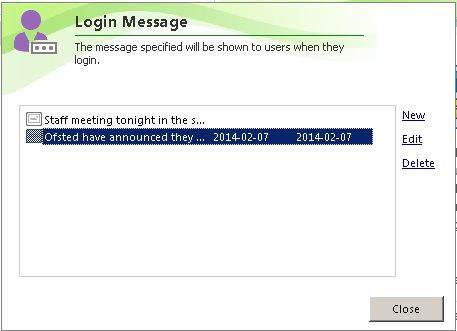
In EISNet Management Studio, we have added a option to show a login message for Pupils, Staff or computers, and at any possible level beneath. For example, you can set a login message to appear for a particular user, intake/class, key stage area or all Pupils (or staff) . Like wise, you can also set a login message for a particular computer, room or all devices.


You can set a Valid From date and a Valid To date, so that the messages expire when they are no longer relevant. In addition, you can choose whether to show the message when the user is logging in, or after they have logged in. On the screenshot below, you'll notice 'Show on wallpaper' this may be added at a later date, but probably won't be in the v1.8 initial release.


The first thing after logging in is a welcome message to the end user. When a staff member logs in, it shows their title (Mr/Mrs/Miss) and surname (for the techies reading this, this is actually the 'displayname' field in Active Directory). For pupils however, it simply shows their first name.


When a message is shown during login, it will show for four seconds before moving onto the next message (assuming there are more than one message to display). In this instance the login is halted whilst the message is displayed, but it will automatically continue once all the messages are read. In a later release, you will be able to customise the amount of time it waits, on a per message basis.


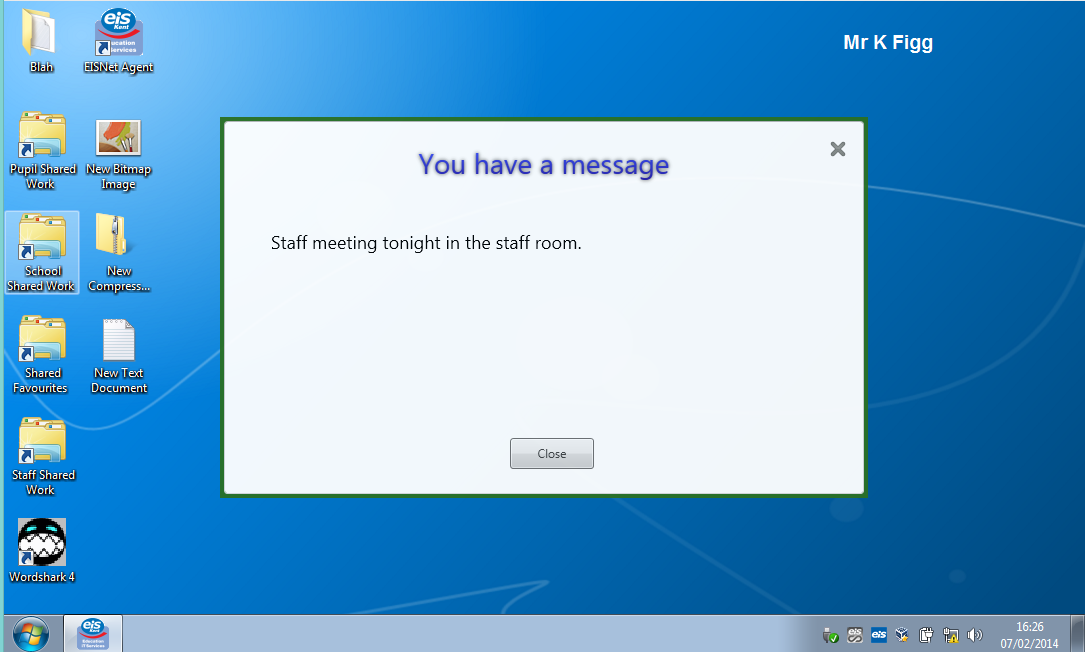
Finally, if a message is set to show after login, they will be shown the message in a familiar prompt style. The user can still use the device and work as normal whilst the message is displayed.


If there are more than one message to display, the window will show 'You have new messages' and also show a 'Previous' and 'Next' button to navigate.

Now that's done - back to Profiles.


Sunday, 26 January 2014

New year update

Profiles

Our focus is now moving to the support for Windows 8.1. One major complication we had when testing with Windows 8.0 was in the area of Profiles.

We have had to adapt EISNet to support the new versions of Windows profiles on Windows 8 and this has meant a re-write to some of the core profile code.

This has also meant we can now work to supporting proper roaming profiles and offline files for a user. This means they will be able to take their laptop home and use it away from their school network without having to log in as 'homework' each time.


Firstly, each user can have a Mandatory or Roaming profile. The current mandatory profile is shown and you can change the profile to another mandatory at any time.


If you select 'Roaming' you will immediately be asked for a template profile to base the new profile on. Once you click OK, the profile will be created and the user can roam on and off the network.


Revisiting the user properties shows you the location of the profile and gives you the ability to view the folder in explorer. In addition, should you want to reset the profile, you can now do this from within EISNet Management Studio.


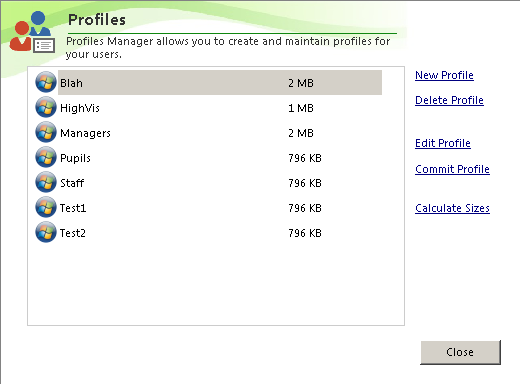
Profile Manager has been practically rewritten to support multiple Profile versions.In addition, it's been rewritten to deal with future profile versions that may come with Windows 9. We have added back the ability to view the profile sizes that existed in EISNet v1.6, but rather than load the sizes immediately, we allow the end user to choose. This prevents locking up Manager whilst it gets the sizes for each profile.


When you Edit a profile, you can now see which profile has been copied to the ProfileSetup user.


When you commit a profile, you can now multi select the destination.


Finally for profiles, the context menu now allows you to duplicate and reset a profile.


Enabling Software for users

A particular bugbear for users was in the area of enabling and disabling of software for users. In EISNet, there are two steps to allowing software to be used. Firstly the software needs to be installed on the Computer. This is managed within Management Studio by installing the package to a room or computer. You would then reboot the device, or let Manager initiate package changes immediately.

Secondly, whilst the software may be installed on a computer, the users will not be able to see the package until you tell EISNet if they are allowed to use it. This process is known as enabling and disabling a package.


When you enable a package for an end user, you will notice, rather than using a drop down list to show the shortcut on the desktop, it is now a simple tick box.


When assigning a start menu folder for a package, again, rather than use a flat dropbox box which does not show the structure, you are now presented with a treeview of the start menu for you to select it's destination. You also have the facility to create, edit  and delete folders as needed.

Finally for packages, you can now multi select shortcuts to show them on the desktop or start menu folder. For example, when enabling Microsoft Office, you can now select all of the shortcuts, and select the required folder once, rather than for each shortcut as was previously required.

Activation Status

One area we know is becoming an issue is the activation of Microsoft products. Specifically Windows and Office. You wouldn't know if the product key hadn't been entered, or an error stopped it from activating until the end user reported the problem.

So we have started to try and make this a bit easier for the network manager.


The first step is to see the activation status from within the Computer Properties window. This feature requires the device to be on at the time, as we get the information in real-time to ensure the the accuracy. 
We will also be adding at a later date a tool for collating this information and showing it in a grid for an overview of the activation status.

Editing the Keystage Structure

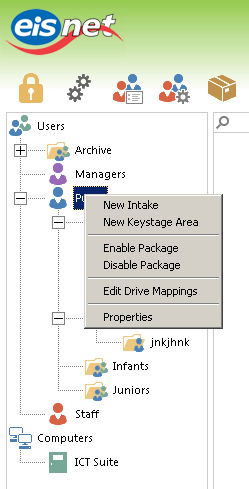
We have added the facility to edit the keystage structure. Some schools prefer not to have Foundation, Infants and Juniors, so we have allowed this to be editable. 


By right clicking the Pupils folder, you now have the facility to Edit the Keystage area.

New Icons

EIS have invested in a new Icon set for our products and EISNet v1.8 will be the first to incorporate them. They give a much more consistent look and feel to the product whilst maintaining the flatness of Windows 8.


Release Date

We aim to release EISNet v1.8 in April 2014. This will enable support for roaming/offline users and Windows 8.1.

Please be aware, EISNet will not support Windows XP or Windows 8.0 (ie, the first release of Windows 8). It only supports Windows 7 and Windows 8.1.

Saturday, 21 September 2013

End of the road for Windows XP

Due to the new components such as Client and Agent being written in Microsoft .Net framework and targeted for v4.5, EISNet v1.8 will not support Windows XP.

EISNet v1.7 is the last version to support the ageing operating system.

So what does this mean for sites that still have XP? EISNet v1.7 will continue to work for the foreseeable future however updates will be limited to major bug fixes only. Currently, v1.7.6 is the last planned version of the v1.7 range but should a major issue be found, it will be fixed and v1.7.7 will be developed.

However, Windows XP will no longer be supported by Microsoft in April 2014. We urge all schools to put into place an upgrade plan to either replace XP devices or upgrade the existing hardware to support Windows 7. EIS are always happy to offer free consultancies to look at your hardware. You might be surprised to learn how much of your devices will work with Windows 7 with just a memory upgrade and Microsoft Windows 7 licence.

In summary, EISNet v1.8 will support Microsoft Windows 7 and Windows 8.1 and is currently planned for release at the end of 2013.


Friday, 9 August 2013

Project Nessy is almost here

It's been a while so it's time to show off some of the nice new features in EISNet v1.8 (or as it's known internally: Project Nessy).

Firstly EISNet Management Sudio

The chrome of the product has been tweaked and now has a much more flat look and feel. We've introduced tabs for easier navigation.


Package Management has been significantly improved in all areas.

Each package can be prioritised to 5 levels. Very Early, Early, Normal, Late and Very Late. This is useful for software like Antivirus where you want it to install last, so it doesn't slow the build down.
You can also specify if the package should be targeted for a particular architecture. For example, you may have PhotoShop 32bit that can only be installed to x86 devices whilst the 64bit version must be installed on x64 platforms. For smaller 32bit software, its common they can run on either 64 or 32bit devices.


In addition, we have included a feature called 'Package Dependencies'. This means, if a piece of software requires another product in install or run, you can specify a dependency. For example, Paint.Net requires .Net Framework 3.5. In the Paint .Net package, you can tell EISNet that it depends on .Net Framework 3.5. EISNet will then ensure that any dependency is installed before the package.


Finally for packages, you can now specify if a package requires a reboot, or should force the reboot immediately after installation.


Station and Package deployment is now easier from within Management Studio. When you view the package status of a device, you can tell EISNet to uninstall or reinstall directly. You can also apply the changes straight away without closing the window. Where a package has failed, you can set it to reinstall directly from within the same window.


LoginScript has been completely rewritten in v1.8. It is now multi-threaded, which means the printers, software, drive mappings and desktop settings are all configured at the same time. EISNet v1.7 and all earlier versions of LoginScript runs in sequence, which means each process has to wait for the previous to finish, v1.8 no longer has this problem. 


ClassChooser has been renamed to EasyAccess and has also been completely re-written. It supports a customisable background image and font. It also has an easy alphabet selector for when small children are learning to use the mouse. Each letter grows as the mouse hovers over it for infant friendly usability. 
More importantly, as the user types their name, the list shrinks with matching users. Therefore, after 2 or 3 characters are entered, the list will be very small.


MyPage has also been re-engineered for a much more modern affect. The wallpaper can be chosen by the end user. Whilst MyPage is fairly empty at the moment, we have more plans for this application which will allow the user to customise it more and given them more of a feeling it is 'their own page'.

Images are all store centrally so their ability to select the background is based on your approved images. 
Please note - for the purpose of testing (and lack of a logo for St Figgy's School), I have used the Healthy School logo. You can chose your own school logo in PNG format which supports transparency, so will fit nicely over any background image you choose.


Finally back to Management Studio. We've worked hard to make EISNet as customisable as possible. As a result we have added options into Manager that allow the above changes to be tweaked how you want them.

The school logo will be used on the MyPage window (and potentially more areas of EISNet in later releases). You can also specify the EasyAccess wallpaper, font and size from within Management Studio.

So in summary - EISNet v1.8 is just a small update!

We are just one step away from starting Project BigFoot.

Tuesday, 30 July 2013

EISNet 1.8 Update

Both Kevin and I have been busy coding away on EISNet 1.8. We've taken this opportunity to move EISNet to .NET and bring in support for Windows 8 (Microsoft are not officially supporting the VB6 libraries on Windows 8)

So what does this mean to you the end users? EISNet is becoming a lot more robust with the ability to fix bugs and implement new features with greater ease. The client side components (Client Service, Agent, MyPage, Class Chooser and LoginScript) have already been rewritten in .NET and the end results are fantastic. The Client service can now handle multiple commands concurrently so while a device is installing packages you could also execute commands and take an inventory with no problems. LoginScript will map drives, connect printers and build the shortcuts simultaneously bringing vastly reduced login times.

On top of this, Agent, MyPage, Class Chooser and LoginScript have a more "polished" look and feel as we're no longer confined to the limitations imposed by VB6.

If I ask Kevin nicely, he might even post some screen shots.